Summary: In this blog, Mare Werner, director of product marketing, explores the difference between traditional reporting and workforce analytics. She highlights how organizations can move from tracking labor data to uncovering actionable insights. Readers will learn how modern solutions, like ADP® WorkForce Suite Enhanced Analytics, help leaders make smarter, more proactive workforce decisions.
By: Maryann Werner
Traditional reporting vs. workforce analytics
Traditional reporting tells you what happened, but workforce analytics tells you why it happened and what to do next. While many organizations use these terms interchangeably, confusing reporting with analytics prevents leadership from maximizing their labor efficiency. Understanding the difference and knowing how to use each is the key to shifting from reactive tracking to proactive strategy.
Here’s how traditional reporting compares to workforce management (WFM) analytics, how to use them and where the newest innovations, like ADP® WorkForce Suite Enhanced Analytics, are improving operations.
What are workforce analytics?
Workforce analytics is the practice of analyzing workforce data to identify trends, understand workforce performance and support better business decisions. Unlike traditional reporting, workforce analytics focuses on uncovering patterns and generating actionable workforce insights that help organizations improve operations.
Traditional reporting vs. workforce analytics
| Feature | Traditional reporting | WFM analytics |
| Core focus | Data aggregation and compliance | Data interpretation and pattern discovery |
| Time orientation | Past tense (What happened yesterday?) | Present and future tense (Why is this happening?) |
| Output type | Static spreadsheets, grids and fixed PDFs | Interactive charts, visualizations and trend lines |
| Primary value | Clean records for payroll, auditing and tracking |
Actionable insights for cost reduction, scheduling, operational effectiveness and strategic planning |
When to use traditional reporting
Reporting is the necessary backbone of daily business administration. It pulls raw numbers directly from your Time and Attendance systems to allow users to review data for accuracy and regulatory compliance.
- Use reporting when you need definitive data points.
- Examples include running end-of-week payroll, auditing an individual employee’s punch times, or checking total hours worked against compliance limits.
- It ensures accuracy, keeps the business legally compliant and maintains a clean historical record of operational truths.
When to use workforce analytics
Workforce analytics takes that exact same raw reporting data and blends it with context to uncover trends, anomalies and operational insights.
- Use analytics when making high-level scheduling decisions or investigating operational issues.
- For example, instead of looking at a list of overtime hours, you use analytics to see which specific shifts, managers, or departments are consistently driving those overages.
- It drives cost optimization, reduces labor waste and empowers managers to fix systemic scheduling issues rather than just treating the symptoms.
Simplifying workforce analytics with Enhanced Analytics
WFM analytics has historically needed significant effort and expertise to access and interpret. As a result, navigating analytics meant sending requests to data analysts or hunting through complex business intelligence tools.
Conversational AI democratizes access to analytics, enabling administrators, HR leaders, supervisors or even executives to explore data, find trends and make informed decisions without specialized training. Instead of building complex queries, users can now interact with workforce data using plain, natural language. The conversational AI engine instantly generates custom graphs and visual charts based entirely on plain language inputs.
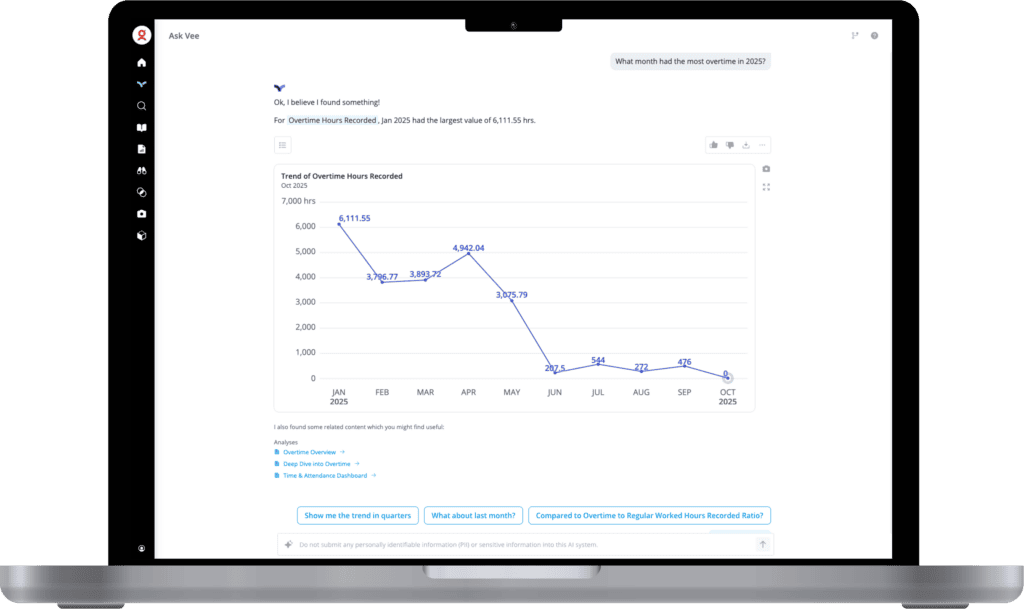
For instance, typing ”Show me a breakdown of absenteeism trends on Friday night shifts over the last quarter,” immediately yields a dynamic visual chart. By transforming text prompts into live, interactive visual models, conversational AI democratizes data which then gives front-line supervisors the instant insights they need to build more stable, efficient schedules.
Another way to reduce friction in driving analytics across the business is to use solutions that were designed specifically for the business function, like WFM. Solutions like Enhanced Analytics were formed by WFM experts with questions and answers which guide non-technical users to easily find overtime, scheduling and headcount answers. Traditional reports answer the questions you know to ask. Dedicated workforce analytics helps you uncover the insights you didn’t know were there.
How Enhanced Analytics helps organizations do more
Enhanced Analytics empowers managers and executives to make faster, data-driven decisions through interactive dashboards, AI-powered analysis and easier access to key workforce metrics. By making workforce data more accessible and meaningful, Enhanced Analytics helps organizations improve productivity, optimize labor costs, enhance compliance and drive better business outcomes.